Photographers: deliver originals and guide clients from Studio
Two jobs, one place. Need to deliver the export folder (JPEGs, RAWs, video)? Use the transfer on the right: one link, full quality. Need print selection, guest uploads, a shop QR, watermarks or your logo? Open Studio in the top menu—each item has a clear job.
Transfer: whole shoot/RAW folder in one link, no compression
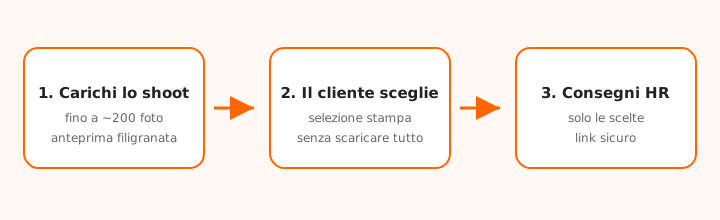
Studio → Gallery: clients pick on watermarked previews
Studio → Events & QR: photos from guests and the counter, no email swap
Same menu: Tools, Inbox and Branding
No “I’ll put them on Drive”, no split zips, no social albums that crush files. Classic transfer for the full dump; Studio (Pro / promo) for selection, events, QR and branding. Italian operator, EU infrastructure.
In Studio open Selection gallery → upload HR → client picks on watermarked previews → you deliver only the chosen full-resolution files (plus the lab report).
Concrete example: wedding
~200 photos · Gallery + Events · RAWs to the lab via transfer
After the wedding you export about 200 full-size JPEGs. In Studio you create a Selection gallery: the couple sees watermarked previews, picks prints, you deliver only those HR files. Want guest photos too? Open Events and put QR codes on the tables. RAWs for the lab go via the classic transfer on this page (export folder as one link).
How it works, in a minute
From transfer to Studio: a link instead of the attachment. No voice-over on the site: press play.
How to deliver a shoot (without Studio)
When the client (or press house) needs everything, not a selection:
Drop the export folder into the form at the top of this page.
Do not downsize them “so they fit”: the cap is not Gmail’s or WhatsApp’s.
Email the client or paste the link in WhatsApp, Telegram or mail.
If the work is private, turn on a password and share it on another channel.
How to run print selection (Studio → Gallery)
When the client must order and should not download the whole shoot:
Sign in and open Studio → Selection gallery → New gallery.
Upload HR files, set a watermark (or Branding logo) and the client email.
Send the link: the client selects photos and sizes.
Review the list, print the PDF report and deliver HR without watermark.
How to collect photos (Events and Shop QR)
Two tools, same idea: the client uploads, you receive.
Events: per-table QR, private event gallery—ideal for weddings and parties.
Shop QR: a fixed counter code; uploads appear in Inbox.
Do not mix them: Events for a day/event; Shop QR for daily studio flow.
Why chat and email ruin the work
WhatsApp and Messenger crush JPEGs. Email attachments stop at 20–25 MB. A link transfer does not touch the pixels. Studio does not replace transfer: it completes it when you need selection, collection or branding.
Plans: what you need
Guest/Free cover everyday JPEG deliveries (Guest: 2 sends/day, up to 10 GB). Pro (or photographer promo) unlocks Selection gallery, Shop QR, branding and sends up to 100 GB—useful with RAWs and 4K video.
Frequently asked questions
Does mandalo.it compress the photos?
No. We keep the files you upload. This is not a social “optimizer”.
Must the client register to download or select?
No. They open the link in a browser: download (transfer) or pick photos (gallery).
Where is Studio in the menu?
After you sign in, Studio appears in the orange bar (next to Photographers). From there: Events, Gallery, Tools, QR, Inbox and Branding.
Transfer vs Selection gallery?
Transfer delivers the whole shoot in one link. Gallery (Studio) shows watermarked previews, collects client picks and lets you deliver only ordered HR files.
Are Events and Shop QR the same?
No. Events is for a wedding/party (table QR + event gallery). Shop QR is a permanent counter code; uploads go to Inbox.
What are Tools and Branding for?
Tools: watermark, compress, convert, edit, PDF. Branding: name, colour and logo on client-facing pages.
Can I send RAW and video with the JPEGs?
Yes, in the same transfer. For very large sends there is Pro (up to 100 GB).
Where are the files stored?
Italian service (FR Italy, Cuneo), EU infrastructure, HTTPS and encryption at rest.
We use essential cookies to run the site. With your consent we also enable analytics and marketing (Google) to improve the service and measure campaigns. Cookie policy