You need to send photos and WhatsApp crushes them, email rejects them or splits them across ten messages. Upload the originals and share a link: they download the same images you shot.
Original quality, not chat previews
Many photos in one go
From your phone, even without an account
Works from a phone or a computer. A holiday folder, party pictures, shots for a friend or a print lab: one send, one expiry.
Share the roll with family without a social album or crushed previews.
Print lab and frames
Full JPEGs for print, not chat-crushed files.
Group chat
One link instead of twenty messages—the chat stays light.
From your phone
On a train or at the beach, no computer needed.
From camera roll to download
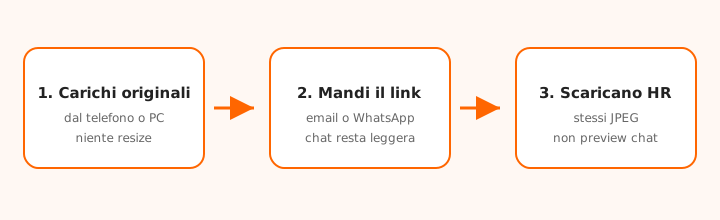
Upload originals, share the link in chat, recipients download full resolution.
Concrete example: holiday roll
~120 phone JPEGs · one link · no chat compression
You come back from a week away with about 120 photos at 3–5 MB each. WhatsApp turns them into previews; email attachments blow past 25 MB. You upload the folder (even from your phone) and send one link to the family group: they download the same JPEGs you shot—fine for printing or the lab.
How to send photos in a few minutes
Open this page on your phone or computer and upload the photos (or the folder).
Do not downsize them “so they fit”: the cap is not Gmail’s or WhatsApp’s.
Send the email notification or paste the link in WhatsApp, iMessage or Telegram.
Recipients download the originals, with no signup.
WhatsApp, Mail and “the photos are too heavy”
WhatsApp compresses. Email attachments hit a cap (often 25 MB) and three phone rolls blow it. Send photos with a link: the chat stays light, the download is full resolution.
Real plan caps
Guest: 2 sends/day, up to 10 GB, 1 recipient.
Free: 50 GB per send, 100 GB and 30 transfers per month, up to 5 recipients.
Pro: up to 100 GB per send, up to 50 recipients.
Professional photos and RAW
If you are sending a high-resolution shoot, TIFF or RAW, use the photographers guide. For everyday phone JPEGs, Guest or Free is usually enough.
Frequently asked questions
Are the photos compressed?
No. They download the same files you uploaded, unlike WhatsApp.
Can I send photos from my phone?
Yes. The form works in the smartphone browser.
Does the recipient need an account?
No.
How many photos can I send?
As many as fit your plan cap (Guest up to 10 GB; Free 50 GB/send and 100 GB/month; Pro up to 100 GB per send).
Is this the same as Photographer Studio?
No. Here you send originals via a link. Studio (Pro) is for watermarked previews and print selection.
We use essential cookies to run the site. With your consent we also enable analytics and marketing (Google) to improve the service and measure campaigns. Cookie policy